Label the lumber
See which parts come from each 2×4×12 ft or 2×4×10 ft board. Understand grouped patterns and make the labels you will use while cutting.
Lumber cut list example →Less figuring. More doing. Apps for the workshop, the job site, and the thoughts you want to keep.
Explore our appsYour measurements, your prices, your business branding.
Estimate screen enclosures, patios, entryways and rescreen work. Import material prices and services from XLSX, preview supported drawings and share itemized PDF estimates.
Planned U.S. pricing: $9.99/month with a 14-day free trial for eligible new subscribers. Not yet available on the App Store.
Plan the layout. Know your materials. Quote the job.
Build rectangular, L-shaped and U-shaped deck estimates with editable prices, deck drawings, framing, railings and straight stairs.
Available now on the App Store.
One-time purchase. Works offline. No account or subscription required.
01 Choose your deck shape and dimensions.
02 Add framing, railing and stairs.
03 Share the estimate and take your lists to the job.
One job. Multiple materials. Clear order lists and measured cutting layouts.
Optimize linear stock and sheet materials, including wood, aluminum, steel, plastic, and drywall. Account for blade kerf, compare stock lengths and costs, and keep reusable offcuts.
Available now on the U.S. App Store.
$4.99 one-time purchase. Works offline. No ads, account, or subscription in the app. The web planner is free. Advertising is planned to help support it.
01 Choose linear or sheet.
02 Add materials and required cuts.
03 Generate your complete job.
Take a cut list from the screen to the actual material on your bench.
Cut Planner's worked examples show all the inputs and the resulting material layouts. Start with fourteen lumber parts, then follow a ten-shelf plywood job. Each example includes the stock dimensions, blade kerf, finished cuts, and remaining offcuts so you can follow the arithmetic.
See which parts come from each 2×4×12 ft or 2×4×10 ft board. Understand grouped patterns and make the labels you will use while cutting.
Lumber cut list example →Read numbered sheet diagrams, compare rotated pieces, and account for saw kerf without assuming extra sheet width.
Plywood layout example →Choose units, save a browser job, make a transferable backup, and understand the CSV and print-to-PDF reports.
Web planner help →Record it. Listen back. Add a little more. Save when you’re ready.
Simple voice notes that give you time to finish your thought, on your wrist or your phone.
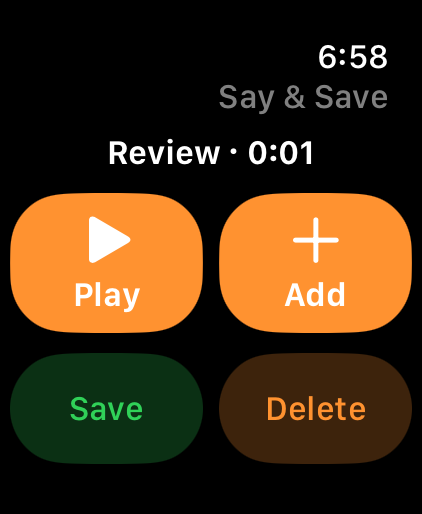
Say & Save on Apple Watch
Preview with sample recording
Recording continues until you tap Stop.
Play it back as often as you like. Tap + to add audio to the same recording.
Save or delete before recording something new. Saved notes transfer between paired devices.
Open a saved recording on iPhone for on-device transcription. Copy the text into another app, or rename a recording so it’s easy to find.
Hands Built Software makes practical tools for everyday tasks. From getting a cut list ready to capturing a thought before it gets away, our apps help you get on with your day.
Audio stays in the app on your devices. No app account is needed to record.
Read the privacy policy